MangaColor
A downloadable tool for Windows and macOS
My rock n' roll pupper just passed away, I am not in my right mind. Please forgive me if there are any mistakes, I am currently, lost. I'm just trying to make it through the day.
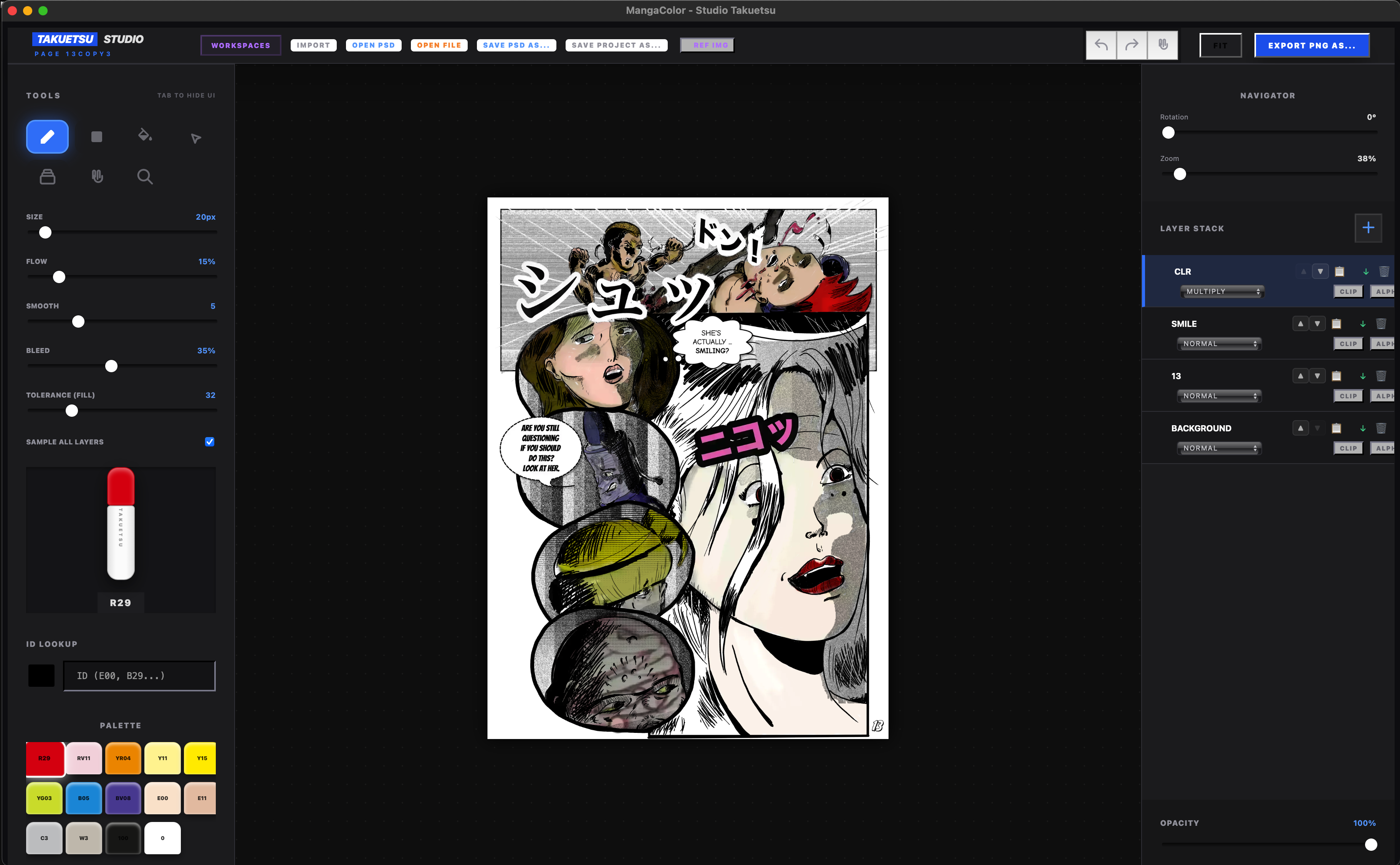
MangaColor: Studio Takuetsu Pro
The tactile joy of classic alcohol markers meets seamless digital manga production.
🎨 Bring Your Line Art to Life with Authentic Marker Physics
Tired of digital coloring tools that feel sterile, flat, and clinical?
MangaColor – Studio Takuetsu Pro is a focused digital art studio designed specifically for comic colorists, illustrators, and mangaka. Experience the warm blending, edge feathering, and natural layering of traditional alcohol-based markers right in your browser or desktop environment—backed by the industrial power of professional multi-layer workflows.
✨ Features Built for Comic Artists
- Authentic Marker Simulation:
- Dual-Tip Physics: Switch effortlessly between soft round brush blending and multi-angle chisel markers that dynamically calculate stroke angle and pen tilt.
- Organic Ink Dynamics: Dial in realistic ink flow, porous paper edge bleed, and coordinate stroke stabilization.
- Curated Copic Palette & ID Lookup: Rapidly select real-world marker tones (R29, E00, BV08, and more) or type exact codes into the active marker HUD.
- Studio-Grade Layer Architecture:
- Non-Destructive Workflows: Full support for Alpha Locks, Clipping Masks, Opacity sliders, and reordering.
- 8 Core Blend Modes: Layer your tones using Multiply, Screen, Overlay, Color Dodge, Color Burn, Hard Light, and Difference.
- Sample-All Smart Fill: Flood-fill your flats under line art with configurable color tolerance, sampling across every layer simultaneously.
- Zero-Friction Reference & Ergonomics:
- Detached Reference HUD: Keep visual reference windows floating right over your canvas workspace.
- Instant Mirror & Zen Mode: Flip your canvas view horizontally (
F) to catch anatomy mistakes instantly, or tapTabto clear away the panels for pure, focused drawing.
- Seamless Production Pipeline:
- Native Photoshop (.PSD) Roundtrip: Import and export multi-layer
.psdfiles directly without needing external conversion tools. - IndexedDB Auto-Saving: Never lose a brush stroke to a dead battery or closed tab; projects auto-cache to your machine continuously.
- Universal Export: Save out crisp, flattened PNGs or native
.mangainkproject files at any time.
- Native Photoshop (.PSD) Roundtrip: Import and export multi-layer
⌨️ Lightning-Fast Shortcuts
| Key | Action |
B / C
| Brush / Chisel Marker |
G / S / E
| Smart Bucket Fill / Smudge / Eraser |
| I | Eyedropper with Copic ID Matching |
[ / ]
| Quick Resize Brush by 10px |
| F | Mirror / Flip Viewport |
| Tab | Toggle Zen Mode (Hide Panels) |
Space + Drag
| Pan Canvas Workspace |
🔒 100% Private, Client-Side & DRM-Free
- No Subscriptions. No Accounts. No Cloud Trackers.
- Everything runs strictly on your local machine using hardware-accelerated HTML5 canvas and local database caching.
- You own your artwork completely and unconditionally.
📦 Ready to Color?
Grab the app below, drop in your line art, and pick your first marker!
Purchase
In order to download this tool you must purchase it at or above the minimum price of $3 USD. You will get access to the following files:
Development log
- MangaColor is now available for mac and PC16 hours ago
Leave a comment
Log in with itch.io to leave a comment.